This is taken from an org post:
https://forums.x-plane.org/forums/topic/307112-wed-26-r2-released-extended-release-notes/
WED 2.6 brings several new entity types for full custom scenery designers, some useability fixes for every user level and bug fixes. As well as a few new and some relaxed validations for the scenery gateway. The only X-Plane 12 specific feature is the polygonal exclusion zones. But before you get too excited, these exclusions are still subject to all prior limitations in how exclusion zones work on individual entities. Plus, they are NOT (yet) working in the sim for forests. The later support support is currently planned for the next generation scenery engine, only.
This release candidate version finalizes support for dual docking jetways and improved object string spacings when used with X-Plane 12.1.2 or later:
Get the binaries here
Highlights
New: Shapes
These items create nothing at all in X-Plane scenery. Just as like "Reference Images" don't do, either:
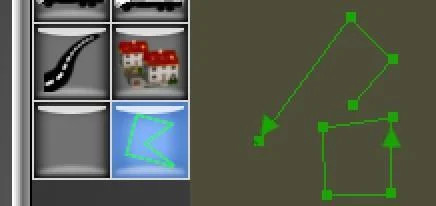
Huh ? Some 3rd party developers use WED to create input data for their addons, like World Traffic paths, Living Scenery Technologies animated routes or O4XP road leveling or runway smoothing polygons. In the past, folks "abused" airport lines for this, which caused all kinds of mixups when the apt.dat meant for these tools were instead placed where the sim finds it.
The new shape entities are written as lines or polygons (closed ways in OSM speak) to industry standard .kml and .osm format files, that can be directly fed into these 3rd party tools. Or dropped into Google Earth or JOSM. They also allow to specify per-vertex or per-instance properties. These are intended as a stable inferface between Laminar and 3rd party scenery design tools. Very unlike WED's internal .xml format, which changes frequently.
New: Polygon exclusions
Exclusion zones used to be rectangular and N-S aligned only. Its called a "bounding box".
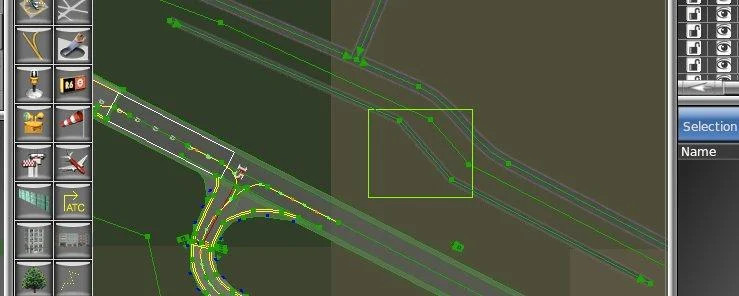
This is an example of a "clever" old-style road exclusion. It takes out the small road inside the airport boundary, but does NOT kill the highway just outside of the airport. But many folks had issue in realizing that your only need to exclude one vertex to get rid of the whole road. So they did some overkill:
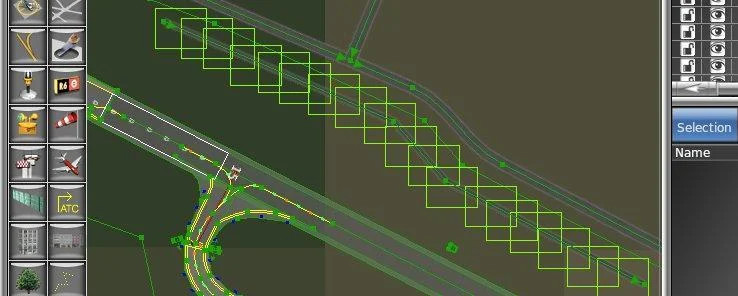
This doesn't do any better, but causes limted harm - it will not kill the highway. Just slows down scenery loading times a bit. At Laiminar that is called "silly". But often folks use bigger exclusions to "make sure" they catch a road vertex, so they draw them this way:
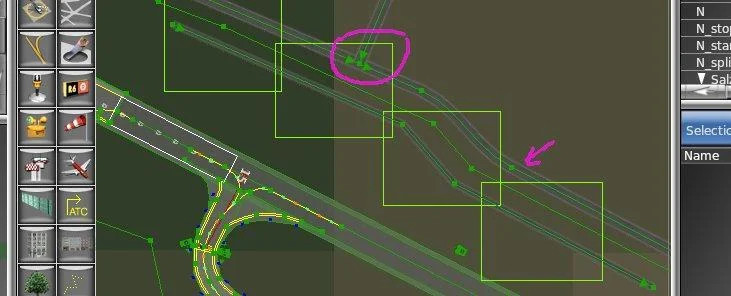
I circled the vertex where these exclusions accidentially kill the highway. And pointed an arrow where the exclusion just barely misses the highway. In the next scenery recut the highway may move a bit. Or users may run simheaven where roads have more vertices for more precise shapes - in all these cases the above exclusions do really nuke a lot of the scenery adjacent to the airport. This is a very poor design technique.
With WED 2.6 and X-Plane 12.0.5+ (yep, no need for 12.1) polygonal exclusions can better avoid unintended side effects:
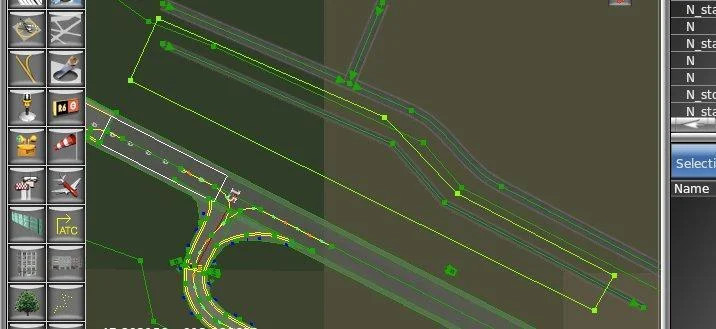
BTW - these sceneries will still work with X-Plane 11. DSF files created with these polygonal exclusions will still load without error messages in X-Plane 10 or 11. But over there the polygonal shape is ognored by the sim and the zones essentially behave again the same as the old-style retangular, bounding box exclusions. If WED 2.6 is set to the XP 11.30 or older export targets, this is also visualized in the map:
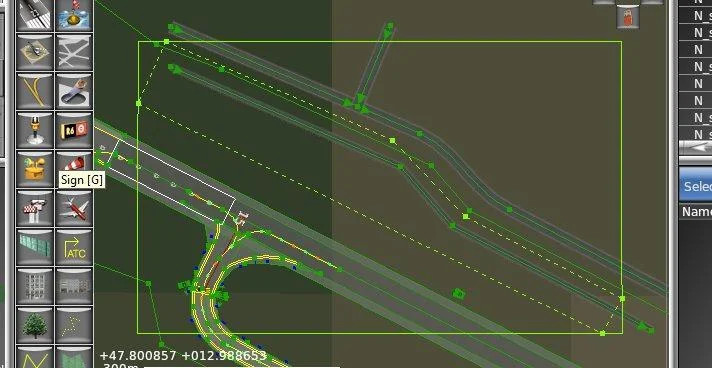
BTW - these sceneries will still work with X-Plane 11. DSF files created with these polygonal exclusions will still load without error messages in X-Plane 10 or 11. But over there the polygonal shape is ognored by the sim and the zones essentially behave again the same as the old-style retangular, bounding box exclusions. If WED 2.6 is set to the XP 11.30 or older export targets, this is also visualized in the map:
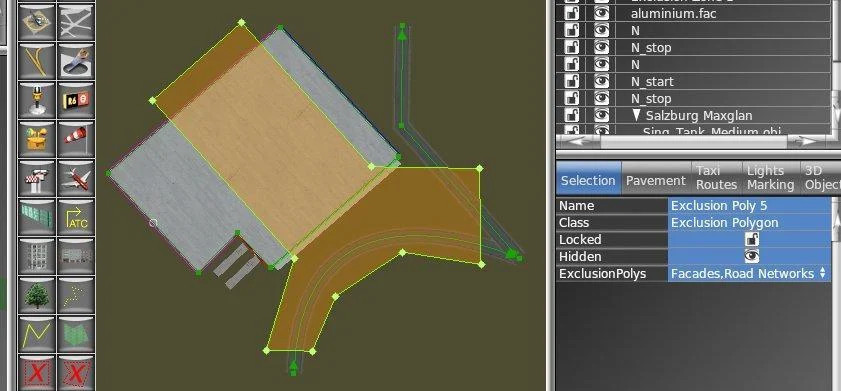
This exclusion will still not change or eliminate the facade, nor will in remove any roads. Neither the old nor the new polygonal exclusions are "exact cutting", i.e. can not "cut a piece off" of sceny entities that are partially outside of the exclsion zone.
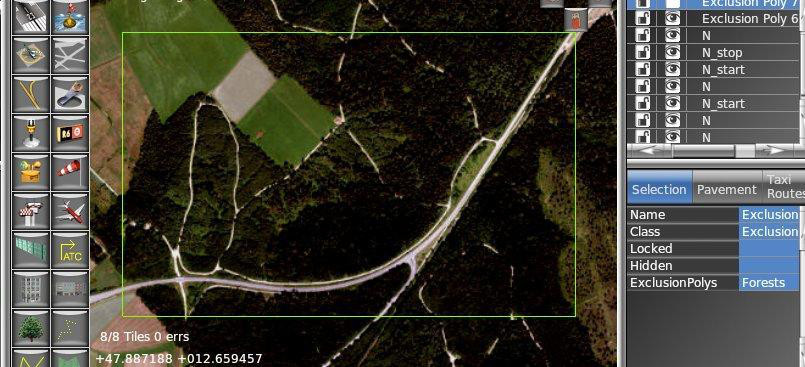
The only entity type where exclusions are "exact cutting" are forests. They remove individual trees in the exact shape of the exclusion, not the netire forect polygon worth of tree's. So at first sight - that is where arbitrary shaped exclusions would be really nice. BUT, unfortunately, on forests, even polygonal exclusions still work ONLY as classic rectangular ones. This is an X-Plane limitation and is not currently planned to be improved on before the next generation scenery engine. So nice try's like this
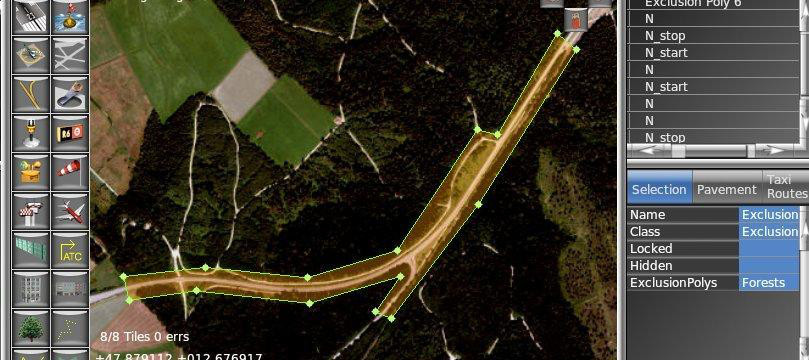
will nort work out as hoped for, but rather still cut a giant rectangular chunk out of the forest:
New: Terrain objects
This are ordinary 3D objects created along with draped orthophoto sceneries. They can be used to depict small scale 3D details and it works with all versions of X-Plane from 10.50 on.
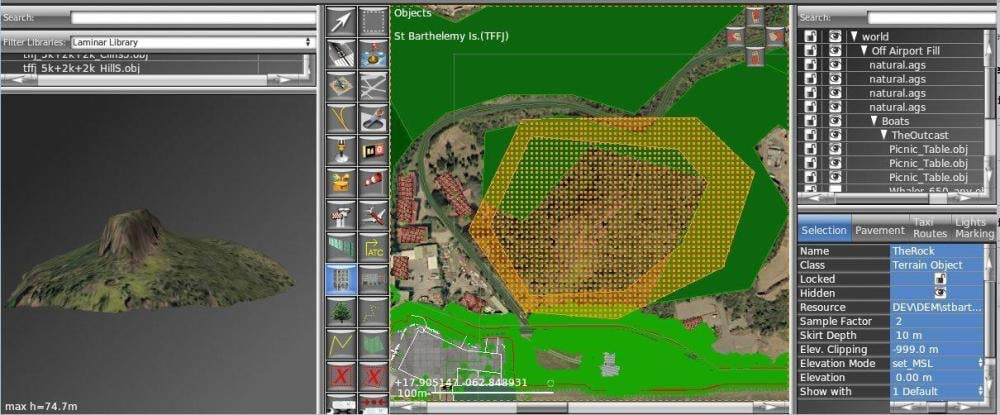
These objects integrate seamless and fully automatic into any draped orthophoto overlay created with WED
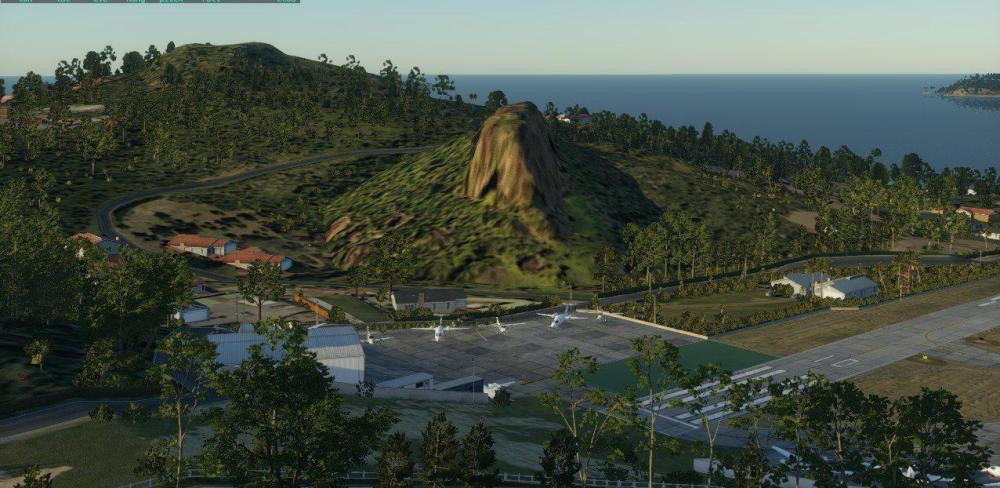
But this has some significant disadvantages over real terrain deforming - no draped content like polgons, roads, run & taxiways or even facades can be placed ontop of it. Only objects can be translated by WED via set_MSL to fit exactly on top of it.
These new entities are intended as a holdover feature until better terrain forming interfaces are available with the next generation scenery rendering engine. I do intend to keep the WED interface to these functions for the next generation scenery stuff the exact same - so in that "great future" you just need to re-export and the DEM used now to create the 3D objects will then go directly into the rendering engine and deform the actual terrain. At that time all limitations wrt draping will go away and the terrain objects become actual terrain.
I will post a separate tutorial on using these in a few days.
Dual Docking Jetways
Starting with X-Plane 12,.1.2 jetways can be specified to dock with either pax door #1 or, if specified in the .acf, pax door #2 of any aircraft. The property is set on the very last node of the jetway facades, the same one where the docking / not-docking property was specified before. A door specified to dock with door #2 will for now NOT dock with any other door #1 of any other aircraft nearby.
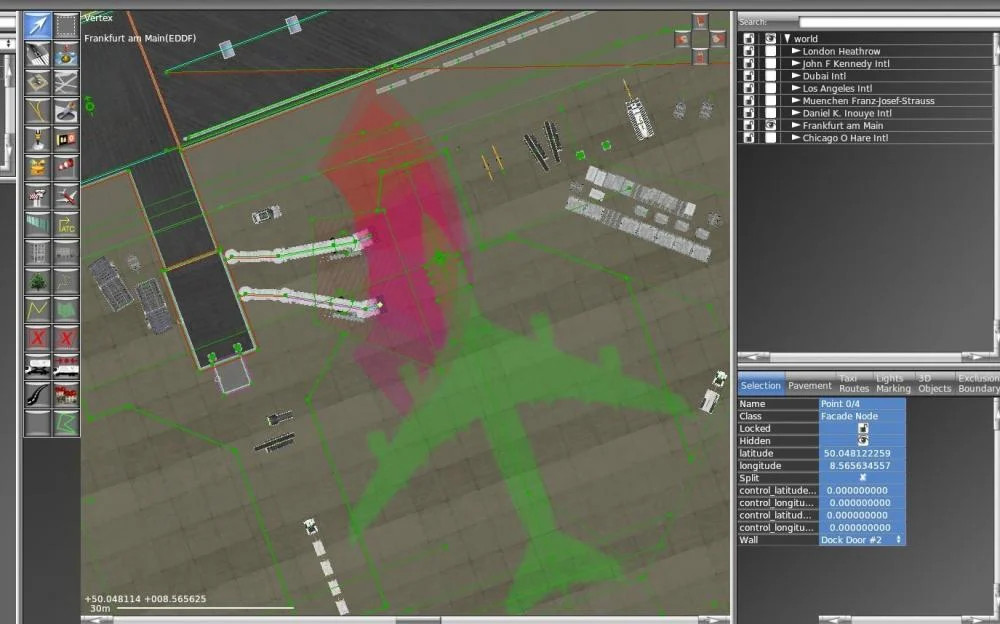
If there is a 3rd or other jetways present, able to reach the same aircraft, these still need to be set to non-docking. The sim has no abilities to select the "best" jetway able to reach the aircraft, nor any ability to detect collisions between jetways. in the example below it could result in implausbly crossed jetways if the 3rd jetway were enabled.
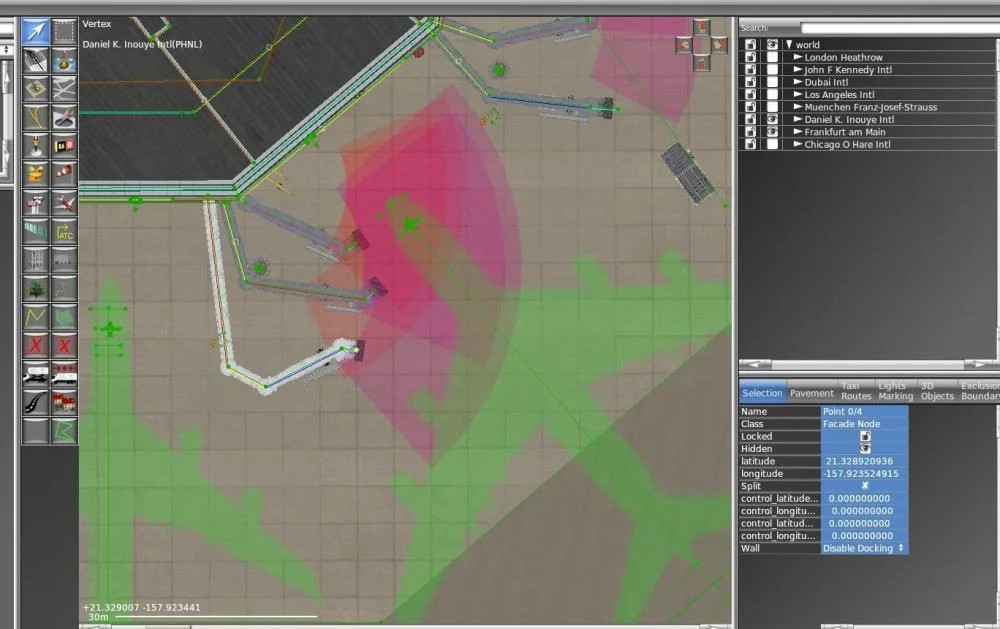
Validation will also indicate if there is a door 2 jetway with no jetway serving door 1 at the same ramp start.
Refined Object string spacings
The spacing parameter for these is an integer in the scenery system - so small spacing in e.g. light strings or terminal kit column strings got rounded down the next full meter. Starting with X-Plane 12.1.2, spacing is using a special encoding scheme to support centimeter accurate spacings up to 400m. This encoding will not cause older versions of X-plane to throw any errors when loading a scenery using this scheme, but rather not show any of the object string items except the very first. Set the export target to X-Plane 12.00 or enter only spacing in full meters to retain the old behavior.
For newbies
Any scenery package without an earth.wed.xml file was in the past opened as a new, empty scenery. This was frustrating for first time users, as they had to read the manual and learn how to import already exported / dsf format scenery back into WED's own database. The dreaded "empty screen" barrier of entry.
Now WED 2.6 will analyze the existing files in the "Earth nav data" directory and offer to import those. So non-WED sceneries "just open fine". But folks will still need to read the manual or watch the tutorials until they arrive at "Export to Scenery" so they don't "just save and sim".
The new auto-import will re-construct the airport hierachies pretty well, even if there are multiple airports as well as off-airport scenery elements present. Only caveat, WED limits itself to do that for sceneries with less than 10 airports and less than 10 DSF tiles, only. So to keep folks from trying to directly "open" the Global Airports and getting puzzled why this takes half an hour plus and WED is "a bit sluggish" afterwards with 38,000 airports and 22 million scenery entities loaded ... but yes, it would, theoretically, work. I create the Global Airports as a single scenery from WED after all.
For Advanced Users
When opening a broken .xml scenery, WED will now look for the earth.wed.xml backup files and offer to open those instead. Jetways have in the sim a bit more reach as depicted in the past.
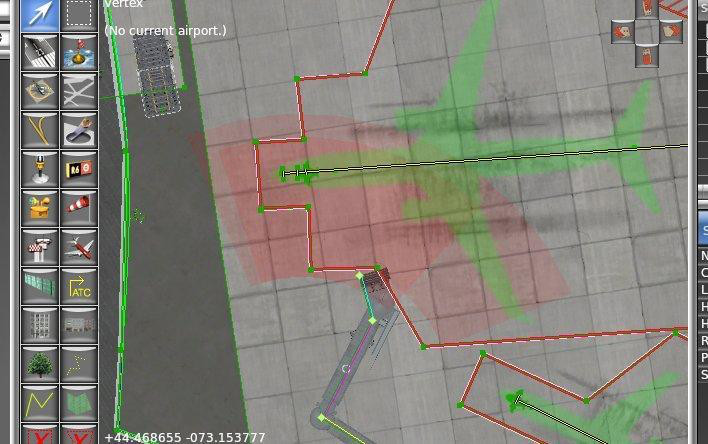
That reach also depends a bit on the angle of the cabin. The new depiction now differentiates a bit what is the "save reach" vs what can be reached only if the cabin angle is right. There was also a bug that resulted in the jetways not retracting as much in the sim as the WED animation shows - this is now fixed in X-Plane 12.1+. Existing custom sceneries need to be re-exported (using any WED version) to get these fixes, the Global Airports shipping with XP12.1 already have all those.
Object string (like taxiway edge/centerline lights etc) spacings and positions now match X-Plane 12 down to half an inch, before they were off by a foot at times.
For Experts
The previews in the library pane depict tiled shader effects for draped polygons.
When exporting to X-plane 11 or older targets, runways with XP12 only EASA style markings are backported to the closest looking FAA markings. Validation will also yell that 2-light APAPI are not available back in XP11.
Validation will allow runways with T suffix in Canada's high north, even if Transport Cananda does not put that suffix into their CIFP data. Should affect at least one airport you never heard about 🙄
Airport boundaries are now rendered with different highligthing in the "Exclusions / Boundaries" tab. So its easier to refine complex boundaries with tons of nearby other stuff. And enable more things to come on boundaries, real-soon-now-TM.
During export to scenery WED now remembers any prior written DSF tiles and will clean those out at the next export. This is needed if e.g. a scenery contains only a few scenery items in a given DSF tile. If ALL these items are moved into the adjacent DSF tile or entirely deleted, the next export has nothing to write to this DSF tile. So it simply stayed on disk as "stale data". This resulted in some surprisng duplication when folks moved that ONE and only items incross the DSF boundary and after the next export got two - one in its "new" location in the "new" tile, plus the leftover old DSF where the items was before.
DEV/ directory. All files required for WED sceneries must be inside the scenery directory at export time. Orthophoto sources (the .tif file) additionally reside in the same directory as the .pol and .dds generated - this is how WED determines WHERE to create these. This presents some inconveniences to remove source art before scenery distribution. With WED 2.6 any source art can be placed in a subdirectory of DEV/ at the toplevel of the scenery. In those cases all derived files will be created in a path that has the DEV/ stripped from it. E.g. a file in DEV/Orthos/xxx.tif will create .pol and .dds in Orthos/xxx.dds and Orthos/xxx.pol
This allows to use the same convention as Laminar uses internally - all source / blender / gimp / dem files etc for a scenery are in DEV/. For distribution the entire DEV/ directory plus the earth.wed.xml can be removed. WED 2.6 does also validate the exported scenery does not reference any art from within the DEV/ directory tree - as that would mean removing DEV/ would break the scenery.
Change history
WED 2.6.0r2 10/23/24 Bug fix: - fix crash when reverting to existing scenery - support longer X-Plane version strings - WED-1524 forests on terrain models not elevated by set_MSL
WED 2.6.0r1 8/16/24 Bug fix: - improve GW upgrade heuristics to change less JW lengths - change GW export target to be XP 12.1.2
WED 2.6.0b3 7/5/24 Features: - force default dir for most file open dialogs to be current scenery pack - make ToolTips in LibraryList more meaningful - support Jetway docking to the 2nd door of the aircraft for XP 12.1.2+ Bug fix: - minor accuracy improvement in map projection for very large objetcs - fix duplicated exclusion zones at full scenery import - WED-1507 fix exclusion polygons still green when locked
WED 2.6.0b2 6/3/24 Features: - full scenery import menu function - new export target 12.1.2 to distinguish string spacing behavior Bug fix: - minor speed improvements for scenery load, export and upgrade heuristics - remove some old XP11 wording in object density menu
WED 2.6.0b1 5/20/24 Features: - polygonal exclusion zones for XP 12.05+ - new entity: shapes to support 3rd party scenery creation tools - new entity: terrain_objects for DEM based, 3D ortho terrain - WED-671: delete DSF written at prior export, but now empty - polygons in Library Preview pane show tiled shader effects - after import from gateway, keep all groups collapsed/closed - improved visualizations in Exclusion&Boundaries tab - suggest to delete obsolete items when downloading XP11 airports from GW - WED-1496 add gw_credits meta tag at gateway export - XPD-15016 Disallow circuits at GW export for one-way airports - refined preview of safe vs ultimate service range of jetways - improved runway light validation warnings - auto-import when opening scenery packages w/o .xml file for 1st time - option to recover from backup with broken .xml files - XPD-15379 validate set_AGL, set_MSL within -1000 ... 10,000m, for GW +/-100m - improved string spacing resolution for XP 12.1.2+ Bug fix: - fix Obj8 drawing not recognizing ATTR_no_blend threshold values - validate ObjectString spacing parameter to be non-zero - validate transition level & altitude meta tags more thoroughly - reduce a few artefacts created by grass mowing function - WED-1482 backport EASA markings when exporting to X-Plane 11 target - in CIFP validation, match runways with T suffix also to CIFP data without T - fix "select with list" gateway import - WED-1482 fix typo in meta tag allows-circuits, repair at file open/apt import - refine validation for trans_altitudes and trans_level, allow flight levels - WED-1493 fix airport not validated upon manual trigger and not at toplevel of hierachy - WED-1487 improve facades and agp objects shown function of showlevel - WED-1501 improve object location accuracy for previews of object strings - validate APAPI not exportable to X-Plane 11 and earlier