About WED
WED is an acronym for World ED itor, and is a free CAD-like software tool that is used to create/edit the following two categories of X-Plane scenery:
As far as WED is concerned, there are not really two separate scenery categories, its all just scenery stuff to WED; however, the file structure for each differs, so for documentation purposes, we distinguish between these two categories.
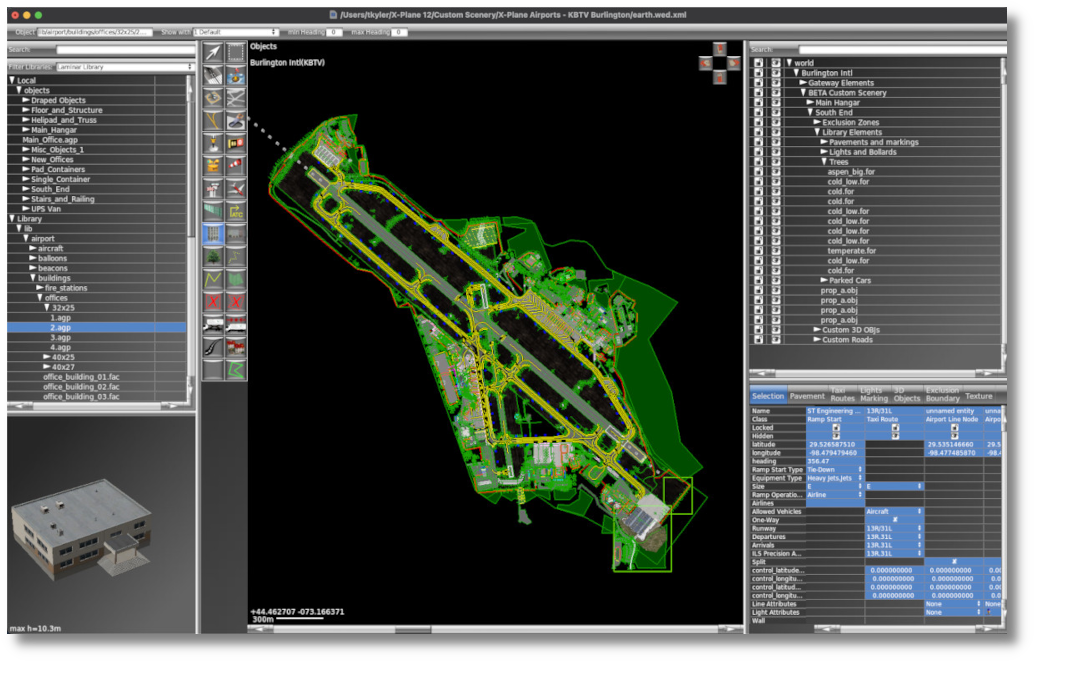
WED is available for Windows®, Mac and Linux. WED contains no scenery/art assets itself, it simply manages art assets contained within the X-Plane folder and visually represent the elements in a manner that is easy to comprehend, visualize and edit.
When you save a WED project (using File > Save), you are not saving or creating the scenery package itself, but rather you are saving a single WED-native XML file that contains all the information required to define and EXPORT (build) a scenery package. Exporting a scenery package is a specific menu action in WED, whereby WED will iterate through its XML file and then create all the necessary files to display the scenery in X-Plane. The XML file IS the WED project file. We sometimes call this XML file the WED Authoring File or Source file.
World Editor is able to:
- Create fully custom airports from scratch
- Modify existing airports.
- Create non-airport (offsite) scenery away from airports.
- Customize the ground traffic flow at an airport, for both service trucks and aircraft taxi routing
- Up/Down -load default (Gateway) airports to the [X-Plane Scenery Gateway]
- Export scenery or airport data files which can be shared with the community.
It is important to understand that WED is limited to editing what is called Overlay scenery. X-Plane scenery is comprised of multiple technologies, using lots of differing files, and rendered in multiple stages. Nearly any part of X-Plane's scenery may be customized; however, most parts of the scenery system are NOT intended to be customized.
This manual only discusses WED and the Overlay Scenery System, which is described further in the Scenery Concepts > Overlay Scenery Packages section of this manual. The Scenery Concepts > Anatomy portion of this manual discuss these other (non-editable) scenery components for overall context and better illustrate how Overlay Scenery fits into X-Plane's broader scenery system.
About This Manual
- Read the intro,
- Read the scenery concepts section
- Read "Best Practices" section
- Read about the tools as required.