Windows and Panels Overview

NOTE

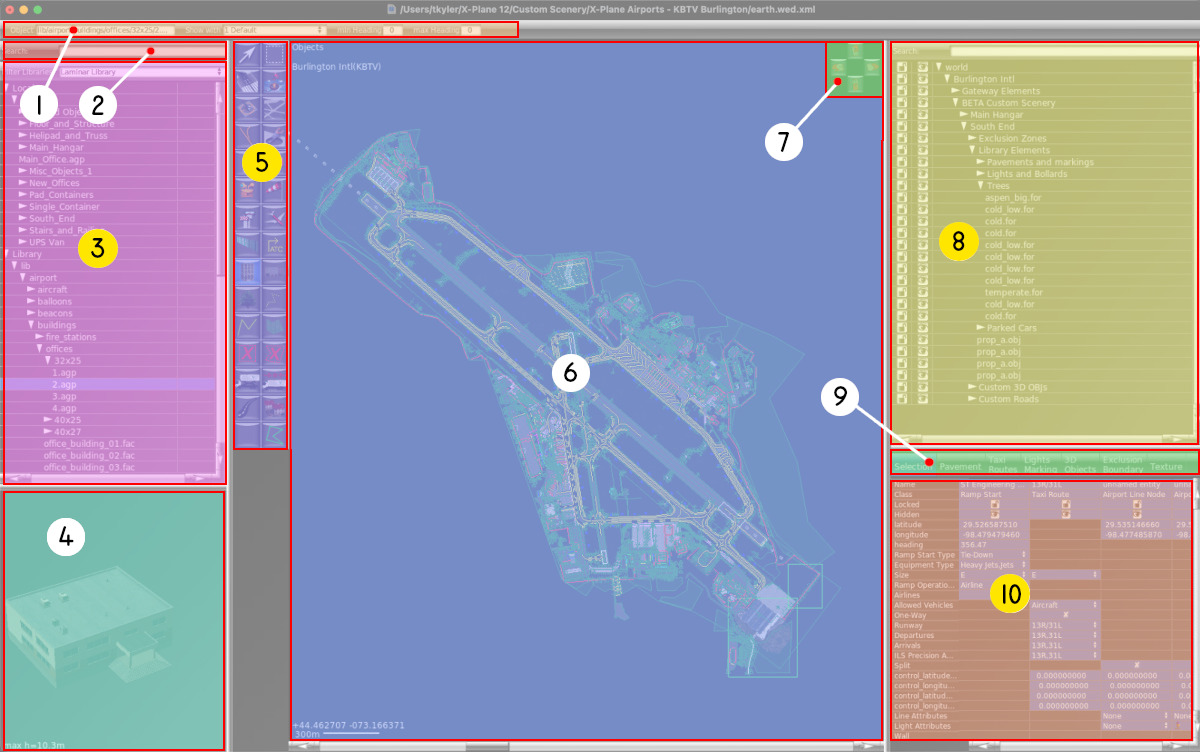
You can hover over any of the 10 panels in the image below to display a tooltip describing each panel. The Yellow circled panels have dedicated pages with more information about those specific panels, and you can click on then to link to those pages. The white circled items only have tooltip information, with no other pages in this manual.

vertex-tool selected-resource-infobar library-search-filter library-contents selected-resource-preview hierarchy-search-filter hierarchy-panel entity-edit-filter selected-entities-properties iso-views map-area

1. Default Attributes Panel

2. Library Assets Search Filter

3. Asset Selection Panel

4. Selected Resource Preview

5. Toolbar

6. Map View

7. Perspective Views Panel

8. Hierarchy Panel

9. De-Clutter Filters

10. Attributes Panel